Mobile app development is booming—thanks to AI, cloud tech, and cross‑platform frameworks. With a sea of tools out there, picking the right one can feel overwhelming, especially when you care about scaling, speed, and a smooth user experience. In this guide, we’ll break down the top 10 mobile app development tools, look at the different kinds of tools you’ll find, and help you choose the best fit for your app’s goals.
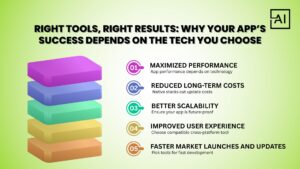
Picking the right mobile app development tool really matters—it shapes your app’s quality, speed, and long‑term success. The best tools deliver top performance, smooth functionality, and lightning‑fast load times. They keep development costs low, make scaling a breeze, and let you roll out new features without a hitch. With the right toolset, businesses can serve up a stellar user experience, thanks to slick UI components, design freedom, and rock‑solid testing. Here’s why it matters:
Optimized native and cross-platform tools ensure faster load times, smooth animations, and better overall performance. Your app feels more professional and reliable.
Choosing scalable tools lowers maintenance, reduces dependency on heavy development cycles, and helps avoid costly rewrites in the future.
Modern App Development Tools support modular architecture, letting teams add features without affecting existing functionality.
Tools with strong UI libraries, design systems, and testing capabilities help deliver a seamless, user-friendly interface.
The right tool allows rapid prototyping, frequent updates, and quick iterations—crucial for staying ahead in the competitive digital market.
Understanding the Types of Mobile App Development Tools makes it easier to choose Free AI Tools the best one for your project:
These tools help developers build apps specifically for one operating system (iOS or Android).
Examples: Android Studio, Xcode.
These tools allow building apps for multiple platforms using a single codebase.
Examples: Flutter, React Native, Ionic.
Designed for non-technical users and rapid MVP creation.
Examples: Bubble, Appian.
Below are the top tools dominating the industry this year:
Google’s UI toolkit that supports cross-platform development for mobile, desktop, and web.
A popular JavaScript framework from Meta for building native-like apps.
The official IDE for Android development.
Apple’s official IDE for iOS, iPadOS, macOS, and watchOS apps.
A leading no-code platform for rapid app development.
Open-source framework for building cross-platform mobile apps using JavaScript or TypeScript.
A powerful low-code automation platform.
A long-standing tool for converting web apps into mobile apps.
A flexible cross-platform SDK using web technologies.
Microsoft’s modern cross-platform framework.
These tools offer simple setups and lower entry barriers.
Ideal for full performance and deep OS-level control.
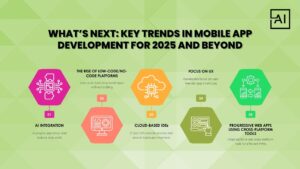
Mobile app development in 2025 is all about AI. Think smarter chatbots, spot‑on recommendations, and features that can guess what you need before you do. Low‑code and no‑code tools are taking off, letting startups and big companies spin up apps faster than ever. Cloud‑based IDEs make remote teamwork a breeze, and designers are zeroing in on UX—smooth animations, intuitive clicks, and a friction‑free experience that feels just right. Additionally, Progressive Web Apps (PWAs) are emerging as a powerful alternative to traditional mobile apps.
AI-powered features like chatbots, personalized recommendations, and predictive analytics are becoming the new standard.
Startups and enterprises are increasingly using low-code platforms for rapid app building.
Cloud development environments make collaboration easier and faster.
Micro-interactions, gesture controls, and fluid animations are essential in 2025.
PWAs are becoming a preferred alternative to traditional mobile apps for certain use cases.
Picking the right tool really hinges on what you’re building, how much you can spend, how comfortable you are with the tech, and where you want to go in the long run. Maybe you like sticking with Android Studio, or you’re into cross‑platform stuff like Flutter, or you’d rather skip code altogether with something like Bubble—each has its own perks. The sweet spot? The tool that fits your business goals and what your users expect.
Choose Aayan Infotech for reliable, high-quality custom mobile app development services tailored to your business needs. Their dev team crafts scalable, user‑friendly apps with the latest tech and best practices. They care about performance, fresh ideas, and a smooth experience, delivering everything from start to finish so your brand can grow faster. Plus, they’re on time, keep security tight, and tailor everything to your needs. Contact us today at +91 7007120194 or email us at info@aayaninfotech.com.
Flutter, React Native, Android Studio, Xcode, Bubble, NativeScript, Appian, Apache Cordova, Ionic, and .NET MAUI are the top tools this year.
Flutter and React Native lead the market due to performance, community support, and ease of use.
Yes, platforms like Bubble and Appian are suitable for rapid prototyping, MVPs, and internal apps.
Android Studio for Android apps and Xcode for iOS offer unmatched native-level performance.
Consider your target platform, performance needs, development timeline, and available skill set.