Driving School App Development is helping driving schools, instructors, and learners manage lessons, schedules, payments, training resources, and communication from one digital platform. Instead of depending on phone calls, spreadsheets, paper records, and manual bookings, a custom driving school app can bring daily operations together in a convenient mobile experience.
For driving school businesses in India, the USA, Dubai, and other growing markets, an app can make lesson booking easier while giving instructors and administrators better control over their schedules. A well-designed platform can include student registration, instructor management, driving lesson booking, online payments, notifications, progress tracking, location features, and an administrative dashboard.
With experience in custom mobile solutions, Aayan Infotech develops scalable applications for startups and businesses using technologies such as Flutter, React Native, Android, and iOS. Its mobile app development service covers the process from planning and design through development, testing, deployment, and maintenance.
Driving School App Development refers to the process of designing and building a mobile or web-based application specifically for driving schools and driver-training businesses.
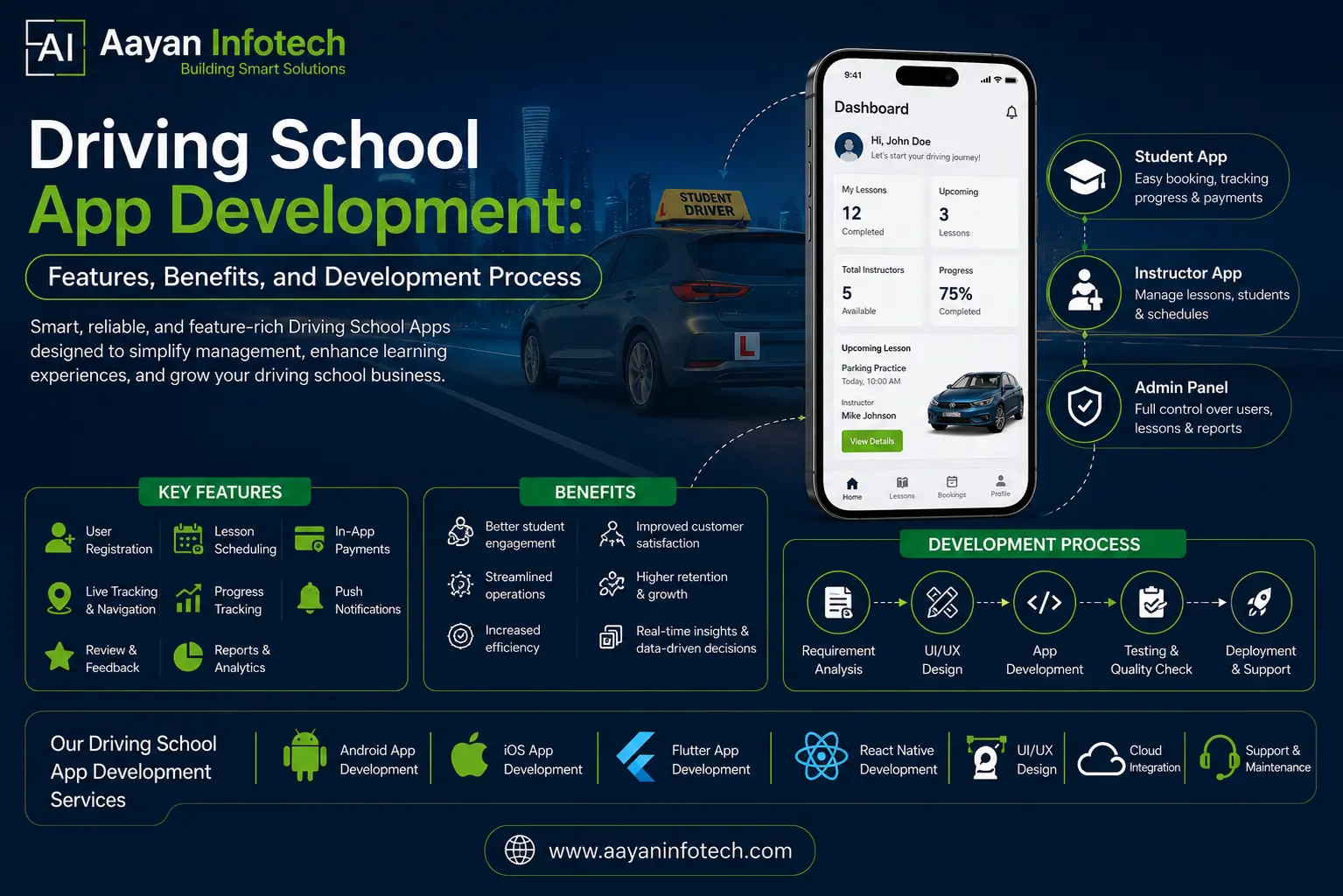
The application can connect multiple users through separate interfaces, including:
A student can use the app to find available instructors, book lessons, make payments, access learning materials, receive reminders, and monitor progress.
An instructor can manage appointments, view learner information, update lesson status, provide feedback, and organize daily schedules.
The school administrator can manage users, instructors, vehicles, payments, courses, reports, availability, and overall business operations.
This makes a driving school app more than a simple booking platform. It can become a complete driving school management solution.
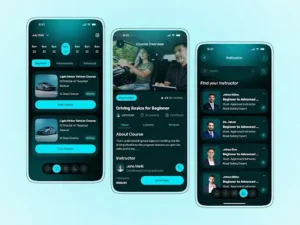
Traditional driving school management often involves multiple disconnected processes. Students may call to schedule lessons, instructors may maintain separate calendars, and administrators may manually track payments and attendance.
A centralized app can reduce these operational challenges.
Students can view instructor availability and request or book driving lessons through their smartphones. Automated scheduling can reduce unnecessary calls and messages.
Driving instructors can access their schedules, upcoming lessons, learner information, and feedback requirements from one dashboard.
The app can integrate secure payment gateways so students can pay for individual lessons, packages, subscriptions, or courses online.
Students can receive lesson reminders, progress updates, course information, practice resources, and notifications without repeatedly contacting the school.
Administrators can manage users, instructors, vehicles, schedules, payments, reports, and other operational information from a centralized dashboard.
A professional mobile experience can help driving schools attract technology-oriented customers, improve customer retention, and expand their services into new locations.
The features should be selected according to the school’s business model, target audience, location, and regulatory requirements.
Students should be able to create accounts and manage essential profile information.
Possible functionality includes:
Lesson scheduling is one of the most important functions of a driving school app.
Students can select:
Real-time availability can help prevent scheduling conflicts.
The instructor interface can provide access to:
This can help instructors spend less time on administrative tasks and more time focusing on learners.
A driving school application can support digital payments for lessons and training packages.
Depending on the target market, payment functionality may include:
Payment methods should be selected based on the countries and markets the application serves.
Notifications can keep students and instructors informed about important events.
For example:
Location functionality can be useful for pickup coordination and instructor tracking.
Depending on the application’s requirements, GPS functionality may support:
Location functionality should be designed with privacy and user consent in mind.
Driving schools can use the application to provide digital learning resources.
These may include:
For commercial driver training in the United States, developers should also account for applicable regulatory requirements. For example, the Federal Motor Carrier Safety Administration’s Entry-Level Driver Training regulations establish federal training requirements for certain CDL applicants.
Instructors can record learner performance after each session.
Progress tracking may include:
This gives students a clearer understanding of their development.
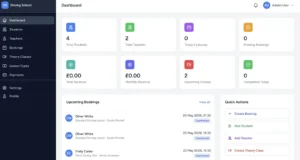
A powerful admin dashboard is essential for managing the business behind the mobile application.
Administrators can potentially manage:
User Management: Add, edit, verify, suspend, or remove student and instructor accounts.
Instructor Management: Manage instructor profiles, availability, assigned learners, schedules, and performance information.
Vehicle Management: Track vehicles, availability, assignments, maintenance records, and related information.
Booking Management: View upcoming, completed, cancelled, and rescheduled lessons.
Payment Management: Monitor transactions, packages, refunds, invoices, and payment status.
Reports and Analytics: Review bookings, revenue, student activity, instructor performance, and business trends.
Content Management: Update courses, learning materials, announcements, FAQs, and other educational resources.
A custom application can provide benefits beyond convenience.
Automating booking, notifications, payments, and records can reduce repetitive administrative work.
Students receive important information directly through the app rather than relying entirely on calls or emails.
Centralized instructor and vehicle availability can make scheduling more organized.
Administrators can use dashboards and reports to understand bookings, revenue, learner activity, and operational performance.
A smooth digital experience can encourage learners to continue using the same driving school for additional courses and services.
The application can be expanded with additional instructors, branches, vehicles, courses, and features as the business grows.
Successful Driving School App Development requires more than simply creating mobile screens. The application should be planned around real business workflows and user requirements.
Start by identifying the target users, business model, locations, courses, booking rules, payment methods, and administrative requirements.
Study existing driving lesson apps and driving school platforms. Identify useful features, user frustrations, pricing models, and opportunities for differentiation.
Create user flows for students, instructors, and administrators.
For example:
Student: Register → Select Course → Find Instructor → Choose Time → Book Lesson → Pay → Attend Lesson → Receive Feedback
Instructor: Login → View Schedule → Review Student → Conduct Lesson → Update Progress → Submit Feedback
Create wireframes and high-fidelity designs before development begins.
The interface should be:
Technology selection depends on project requirements.
Aayan Infotech works with technologies including Flutter, React Native, Android, and iOS for custom mobile applications. Its development approach also covers backend integration, testing, deployment, and maintenance.
A possible architecture may include:
The final technology stack should be selected after technical discovery rather than applying the same architecture to every project.
Development can begin with the core features before adding advanced functionality.
An MVP may include:
Advanced functionality can be introduced after validating the initial product.
The application should undergo functional, usability, security, performance, and device testing.
Testing should cover:
After testing and approval, the application can be prepared for publication through the relevant app stores and deployed to the required backend infrastructure.
Post-launch support is important because mobile operating systems, security requirements, third-party APIs, and user expectations continue to change.
Regular maintenance can include:
The cost of Driving School App Development depends on the application’s complexity rather than one fixed price.
Major cost factors include:
A basic MVP will generally require less development effort than a multi-branch platform with advanced scheduling, real-time tracking, analytics, subscriptions, and AI-powered functionality.
For an accurate estimate, businesses should first prepare a detailed feature list and technical specification.
Location should be considered during the planning stage because driving education, licensing procedures, payment preferences, privacy requirements, and business workflows can differ between markets.
For example, a driving school app targeting India may require local payment methods and regional language support.
A platform targeting the USA may require integrations and workflows appropriate to specific states and driver-training programs.
A Dubai driving school app may need Arabic and English support, local payment options, location-based services, and workflows designed around the requirements of the relevant local authorities and driving schools.
Therefore, localization should be built into the architecture rather than treated as an afterthought.
Driving school platforms can process personal information, payment data, location information, and training records. Security should therefore be considered from the beginning of the project.
Important measures may include:
The exact compliance requirements depend on the countries, users, integrations, and data collected by the application.
Artificial intelligence can add advanced functionality to a driving education platform when implemented responsibly.
Potential applications include:
The system can recommend theory lessons or practice materials based on a learner’s progress.
AI-assisted scheduling could consider instructor availability, student preferences, locations, and lesson duration.
The platform could identify areas where a learner needs additional practice and recommend relevant content.
A chatbot can answer common questions about courses, bookings, schedules, and application functionality.
AI features should complement qualified driving instructors rather than replace practical driver training or professional judgment.
Choosing the right development partner can affect the application’s scalability, security, performance, and long-term maintenance.
Aayan Infotech provides custom mobile application development for businesses in India, the USA, and international markets. The company works across Android, iOS, Flutter, and React Native and provides development support from concept and design through deployment and maintenance.
For a driving school platform, the development team can help transform business requirements into a structured product with student, instructor, and administrator experiences.
The development process should begin with discovery rather than immediately writing code. This helps identify the required features, user flows, integrations, technical architecture, and future scalability requirements.
Driving School App Development can help driving schools create a more organized, accessible, and scalable digital experience for students, instructors, and administrators. From lesson booking and instructor scheduling to online payments, progress tracking, learning resources, notifications, and analytics, a custom application can bring important operations into one platform.
The best solution is not necessarily the application with the largest number of features. It is the one that solves real business problems, provides a simple user experience, protects user data, and can scale as the driving school grows.
If you are planning Driving School App Development for a business in India, the USA, Dubai, or another market, Aayan Infotech can help turn your concept into a custom mobile solution. Start with your business requirements, define the MVP, select the right technology, and build toward a scalable platform.
Ready to build your driving school app? Contact Aayan Infotech to discuss your idea, required features, target market, technology requirements, and development roadmap.