In the modern rapidly changing digital market, having a mobile responsive Shopify site is insufficient. Customers of online stores are requesting to experience notable acceleration, improved navigation, and personal shopping experiences. This is where custom mobile app development for Shopify stores has become a game-changer for modern eCommerce brands.
The combination of a custom mobile application is one that will enable you to provide a strong, flawless experience that will enhance the engagement, internally gain stronger loyalty to the brand, and lead to a higher conversion rate. We will discuss how you may create the ideal Shopify mobile application to your store, step by step.
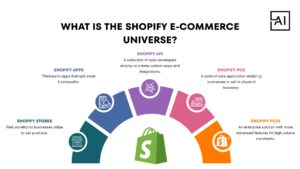
Shopify is among the most versatile and strong eCommerce platforms in the world that empowers over a million traders around the world. It offers all that a business requires, product management, secure payments, analytics, automation, and integration of third-party apps.
However, with mobile shopping taking over in the eCommerce world, companies cannot afford to rely on websites only but adopt personalized Shopify mobile apps to enhance their performance according to the changing consumer demands.
Building a mobile app for your Shopify store is no longer optional — it’s essential for long-term growth and competitiveness.
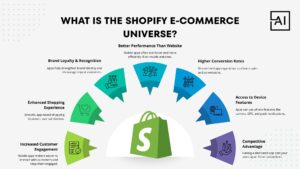
Mobile apps provide a personalised, on-the-go shopping experience. With features like push notifications, recommendations, and loyalty rewards, you can keep customers engaged and returning more frequently.
A custom mobile app ensures lightning-fast performance, intuitive navigation, and smooth checkout — much better than a typical mobile website.
Your app icon stays on the customer’s screen 24/7. It reinforces brand identity and creates a deeper emotional connection.
Mobile apps convert up to 2–3x more than mobile websites because of superior UX, saved user data, secure checkout, and personalised product suggestions.
Apps load faster, offer better UI control, and minimize friction — essential for reducing cart abandonment.
With features like GPS, camera, biometrics, and one-tap payments, apps improve user convenience and functionality far beyond what mobile websites can offer.
Most Shopify stores still rely only on web traffic. Having your own app immediately sets you apart as a professional, trusted brand.
When building your Shopify mobile app, consider including:
These features ensure a smooth and engaging shopping experience for customers.
Building a custom mobile app with Shopify requires understanding its API ecosystem and using the right frameworks.
Shopify offers:
Understanding these APIs helps you create a robust, sync-friendly app.
Top frameworks for Shopify mobile app development include:
You need secure authentication using:
Integrate:
The idea is to match your Shopify store’s experience — and enhance it.
Test your app for:
Then deploy to:
Shopify app builders may look convenient, but they come with major limitations:
For fast-scaling businesses, these builders restrict long-term growth. A custom Shopify mobile app gives better control, unique branding, and powerful scalability.
To build the best possible Shopify mobile app, follow a structured approach:
Identify whether you want:
Clear goals help design a more effective app.
Pick from:
Your choice should depend on budget, timeline, and feature complexity.
Use Shopify APIs for:
APIs ensure your app stays perfectly connected to your store.
A beautiful, intuitive, modern design increases user satisfaction. Keep it:
Run performance, security, UI, and real-device tests. Fix every friction point before launch.
Launch the app, gather insights, monitor analytics, and release regular updates for:
A custom Shopify mobile app offers:
Custom-built apps align perfectly with your store’s business goals — something templates can never achieve
A personalized mobile application to your Shopify account is one of the most efficient moves towards a larger eCommerce company. Shopify mobile app has the winning power in the current competitive market whether you need to drive more engagement, improve conversions, or ensure a smooth shopping process.
Hire Aayan Infotech for the best Shopify mobile app development and transform your online store into a powerful, high-performing mobile shopping experience. Our team of professionals products lightning-fast, easy to use, and highly-customized Shopify apps that will help to increase the involvement, enhance the conversion rate, and strengthen the loyalty of the brand. Aayan Infotech offers mobile solutions designed according to your business requirements and is scalable with a smooth API integration, flow user interface, and functionality. We will transform your Shopify shop into a mobile app exception. Contact us today at +91 7007120194 or email us at info@aayaninfotech.com